XFINITY Home
- 3.9
- Rating
- 1.00M
- Installs
- Free
- Price
 Analysis by App-foxy
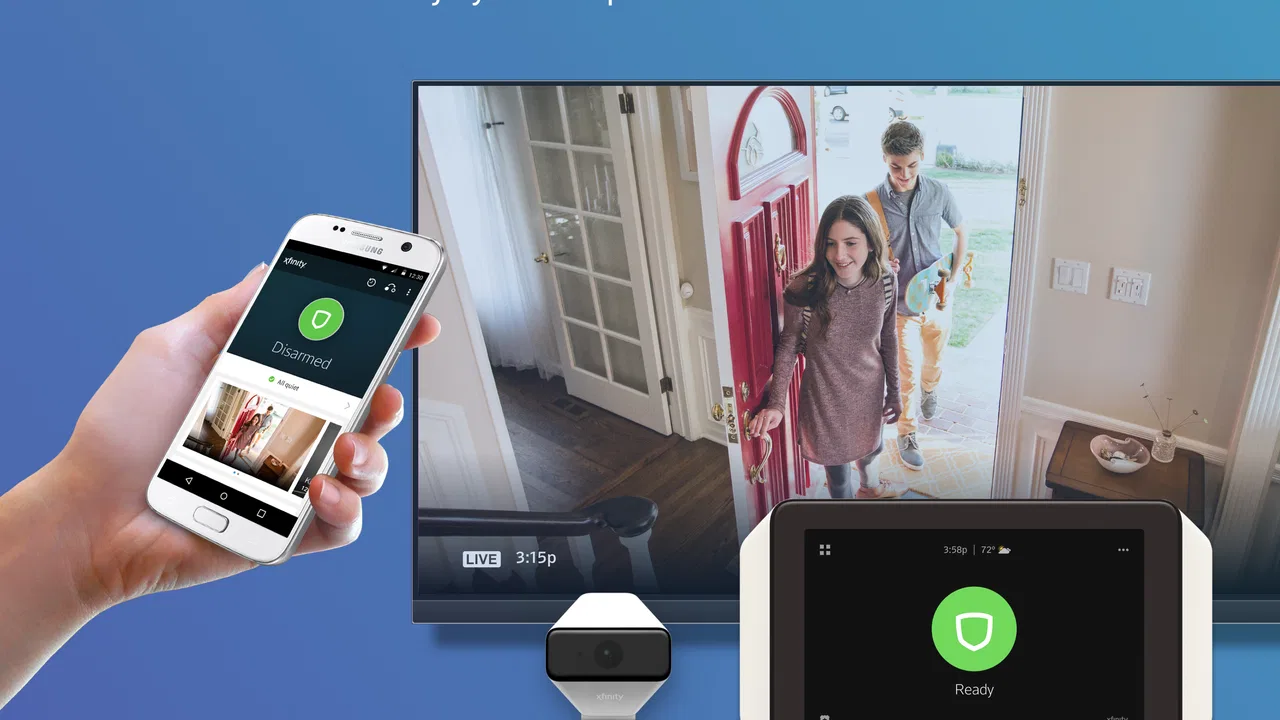
When I use XFINITY Home, I think of it less as a general smart-home dashboard and more as a way to keep an eye on the home while I am away. That distinction matters. The app is built around the XFINITY Home service, so its value is strongest for people who already use that service and want a convenient mobile view of what is happening at home. If you are looking for a universal controller for equipment from many unrelated brands, this is not the kind of app I would choose first.
In my experience, the most useful capability is remote awareness: being able to check in from a phone instead of wondering whether everything is fine. That can make a real difference during an ordinary day. I might leave for work and later wonder whether the home is secure, or I might be away and want to check the situation before deciding whether I need to ask someone nearby for help. The app gives that concern a practical place to go rather than leaving me to rely on memory or guesswork.
It is a free lifestyle app from Comcast Cable Communications, with an Everyone content rating. Its long presence on mobile devices, beginning in April 2012, helps explain why it feels like a companion to an established home service rather than a novelty gadget app. The current release is version 12.74.2, and it supports Android 7.0 or later. On the Android side, it has passed a million installs and holds a 3.9 average from roughly 49 thousand ratings, with about 20 thousand written reviews.
You May Also Like

 Blood Strike: 2.5 Anniversary
Blood Strike’s Loadouts Turn Every Drop Into a Tactical Gamble
A close look at Blood Strike’s custom loadouts: how fast access to signature weapons reshapes its battle royale rhythm, rewards preparation, and narrows the gap between fights.

 Pandora - Music & Podcasts
Pandora’s Music Is Easy to Start, but Harder to Recover
Pandora’s strength is its low-effort path from a seed to a station. Its weak spot is how much confidence it asks you to place in connection, setup, and quiet recovery.

 8 Ball Pool
 Is Built on Rivalries, Rematches, and Routine
A close look at the rivalries, rematches, shared routines, and unanswered safety questions that turn a quick pool match into a persistent mobile community.

 Samsung Music
’s Quiet Strength Is Playing What You Already Own
Its reach comes less from spectacle than from dependable access to a personal library. That simplicity is both the app’s strongest retention engine and its ceiling.

 AccuWeather: Weather Radar
AccuWeather Review: A Quick, Clear Forecast for Everyday Decisions
For everyday plans, the best forecast is the one you can understand quickly. AccuWeather makes rain timing, radar, and local conditions easy to act on, with a few trade-offs.

 Hill Climb Racing
Why Hill Climb Racing Still Turns Crashes Into One More Run
A tiny car, a bumpy hill and one more upgrade: Hill Climb Racing keeps resurfacing because its simple chaos makes every near-miss feel personal.
More From Our News Desk



Remote awareness is the feature that matters most
I find remote awareness most useful when it helps me make a decision, not when it becomes a reason to keep checking my phone. In this section, I look at how that distinction plays out during ordinary routines and what makes a quick status check worthwhile. That also leads to a practical question: how does the experience change when I am away from home and relying on a mobile connection?
What checking in changes during a normal day
The central benefit is not that I can stare at a screen all day. It is that the app shortens the gap between a question and an answer. If I am already away from home, opening the app is more useful than trying to reconstruct what I did before leaving. That is especially helpful when my routine changes, when another person is expected at the house, or when I am traveling and want a simple way to stay connected.
This kind of access also changes how I prepare to leave. Instead of treating home security as a single action at the front door, I can use the app as a second check after I have gone. That is a small habit, but it is one of the more realistic reasons to install it. The app does not need to become the center of my day; it only needs to be available when uncertainty appears.
I would not describe this as a replacement for being physically present. A phone screen cannot inspect a room, speak to a visitor, or solve a problem by itself. What it can do is make the connected part of the XFINITY Home setup easier to reach. That makes the app valuable as a remote companion, not as an independent home-management system that works without the related service.
How I would use it after leaving home
A realistic example is a busy morning when I leave in a hurry. Later, I remember that I was distracted while getting out and cannot confidently recall whether the home was set the way I intended. I open the app, check the available home status, and use that information to decide what to do next. If everything looks right, I can continue my day. If something needs attention, I have a clearer reason to contact someone or return.
The important workflow is the sequence: open the app, look for the current state, interpret it in the context of my routine, and then act only if necessary. That sounds simple, but it is a better approach than repeatedly checking without a reason. I find the app works best when I use it as a quick confirmation tool rather than expecting a constant stream of reassurance.
Another useful situation is coordinating with a household. One person may leave early, another may return later, and the person who is away may want to understand whether the home is in its expected state. The app can reduce some of the back-and-forth messages that otherwise fill this kind of arrangement. It does not remove the need for communication, but it can make conversations more specific because the person checking has a current reference point.
Why the service connection is important
There is a practical trade-off hidden in the app’s design: its usefulness depends on being part of the XFINITY Home environment. That is not a flaw for an existing customer, because the app gives that service a mobile interface. It is a limitation for someone browsing apps and hoping to build a system from scratch with whatever devices are already in the house.
Before installing it, I would first ask whether my home is already set up for XFINITY Home. If the answer is no, the download alone is unlikely to provide the experience I am looking for. This is one of the most important decisions for a new user, because a polished app cannot compensate for choosing the wrong service ecosystem. People who want broad compatibility should compare universal smart-home platforms instead.
For an existing user, though, the connection is a strength. I do not have to treat the mobile app as a separate experiment with a different purpose. It is focused on bringing the home service into a situation where I am away from the house, which is exactly when a phone interface is most useful.
Where it fits beside ordinary alternatives
The usual alternative is doing nothing more than relying on a routine: lock the door, leave, and trust that everything was handled correctly. That approach is free of setup and screen time, but it offers no convenient way to check later. XFINITY Home is better when uncertainty is common or when being away for long periods makes reassurance worthwhile.
Another alternative is using separate apps for individual smart devices. That may suit someone who enjoys choosing products independently, but it can create a scattered experience. One app may handle a camera, another a sensor, and another a different home device. The advantage of a service-focused app is concentration: I can return to one place associated with the XFINITY Home setup instead of remembering which brand controls which part of the home.
On the other hand, a broader smart-home platform may be better for someone who wants to mix brands, create elaborate routines, or keep control independent of a particular provider. I would not pick XFINITY Home merely because it is free to download. I would pick it when the underlying XFINITY Home service already matches my household and I value a straightforward remote check more than unlimited customization.
A careful look at everyday friction
The first source of friction is context. A status shown in an app still needs interpretation. If I am not familiar with the home’s normal setup, I may not know whether a change is expected or requires action. That means the app is most comfortable for people who have already established a routine and understand what their home should look like when everything is normal.
The second issue is attention. Remote access can be reassuring, but it can also encourage unnecessary checking. I get more value when I decide in advance when a check is useful: after leaving, before sleeping, or during travel. If I open the app every few minutes without a specific concern, the convenience starts to feel like another source of mental clutter.
There is also the broader dependence on a phone and a connected service. When I am evaluating an app like this, I do not judge it only by how attractive the interface feels. I ask whether it fits the way I already manage the home, whether the people in the household can understand the workflow, and whether I am comfortable depending on a mobile connection when I am away. Those questions are more important than a long feature list.
Small habits that make the app more useful
My first tip is to create a consistent checking habit instead of using the app randomly. For example, I would check once after leaving on an unusual day, then stop unless there is a reason to look again. This keeps the capability focused on confirmation and prevents it from becoming a repetitive ritual.
My second tip is to agree on household expectations before relying on remote status. If several people use the home, everyone should understand what “normal” looks like and who is responsible for responding when something is unexpected. The app can show information, but it cannot decide which household member should act. A short conversation can prevent confusion later.
My third tip is to test the workflow when I am still near home. I would open the app, identify the information I actually need, and make sure I understand the difference between an expected state and a situation that deserves attention. Practicing during a calm moment is better than learning the interface while traveling or already worried.
A fourth insight is that remote awareness is most valuable at transition points. Leaving for work, arriving home, starting a trip, and preparing for the night are moments when a quick check has a clear purpose. Between those moments, constant monitoring usually adds less value. Thinking in transitions makes the app feel like a useful tool rather than an always-open obligation.
Who gets the strongest value
I would recommend XFINITY Home most readily to an existing XFINITY Home household where one or more people regularly spend time away from home. It is also a sensible fit for people who prefer a focused service app over a collection of separate device apps. The free download lowers the barrier to trying the mobile side of the service, and the Everyone rating makes it suitable for a household with different age groups using the phone.
It can be particularly helpful for someone whose schedule makes home status difficult to remember. Shift work, frequent errands, travel, or a household with different arrival times can all create moments where a remote check is more convenient than a phone call. In those cases, the app’s value comes from reducing uncertainty at exactly the time it appears.
I would be more cautious recommending it to a person who has no XFINITY Home setup, wants complete brand freedom, or expects the app to manage every smart device in the house. That user may be happier with a platform designed around broad device compatibility. I would also suggest skipping it if remote home awareness is not something the household will actually use; an app cannot justify itself simply by being installed.
My overall experience with the mobile companion
What I like most is the clear purpose. XFINITY Home is not trying to be my entire digital life. It gives the XFINITY Home service a way to remain useful when I am not physically at home, and that is a meaningful improvement over relying only on memory. The best moments are quiet ones: I check, understand the situation, and get on with my day.
What keeps me from calling it a universal recommendation is the ecosystem requirement and the need for sensible habits. The app makes the most sense when the related service is already part of the home. It is less compelling as a standalone download for someone comparing unrelated smart-home options. That distinction should guide the decision more than the rating or install count.
After using it as a remote awareness tool, my opinion is positive but specific. I would recommend it to a friend who already has XFINITY Home and wants a practical way to stay connected while away. I would not recommend choosing the wider service solely for the app without first deciding whether that ecosystem suits the household. Used in the right setting, it turns a common worry into a quick check; used in the wrong setting, it is simply another app that does not match the way the home is managed.
FAQs for XFINITY Home
01What features does XFINITY Home offer?
XFINITY Home provides a comprehensive suite of home security and automation features. Users can monitor their home with live video feeds, control smart devices like lights and thermostats remotely, and receive real-time alerts for security breaches. It's designed to integrate seamlessly with other smart home devices, enhancing overall convenience and security.
02Is XFINITY Home compatible with other smart home devices?
Yes, XFINITY Home is compatible with various third-party smart home devices. It supports integration with popular brands like Nest, Philips Hue, and August. This compatibility allows users to create a cohesive smart home environment where multiple devices can be controlled through a single platform for increased efficiency and ease of use.
03How secure is the XFINITY Home system?
XFINITY Home prioritizes security, employing advanced encryption methods to protect user data and privacy. The system includes features like professional monitoring, real-time alerts, and backup battery power to ensure continuous protection. However, it's crucial for users to maintain strong, unique passwords and regularly update their app to safeguard against potential security threats.
04What are the costs associated with XFINITY Home?
The cost of XFINITY Home varies based on the selected package and any additional equipment or services. There is typically a monthly subscription fee for the monitoring service, along with potential upfront costs for equipment. It's advisable to review the pricing details on the official website or contact customer service for the most accurate and up-to-date information.
05Can I customize the XFINITY Home app notifications?
Yes, the XFINITY Home app allows users to customize notifications according to their preferences. Users can set alerts for specific activities, such as doors opening or motion detection, and choose how they receive these notifications—whether via push notifications, email, or text. This flexibility ensures users receive only the alerts that are most relevant to them.
Pros
- User-friendly interface for easy navigation.
- Customizable alerts for personalized security.
- Remote access to control devices anytime.
- Integration with smart home devices.
- 24/7 professional monitoring available.
Cons
- Monthly subscription can be costly.
- Limited compatibility with some devices.
- Requires stable internet connection.
- Setup can be complex for beginners.
- Occasional app performance lags.

XFINITY Home
Gallery